DsFqIEnm Big Bug Ban

Big Bug Ban

兴趣 践行 创新

我不想长大!!!


真的…我不想长大..

长大带给我的除了忧伤还有什么呢?
不知道..我真的不知道

或许长大了,懂事了
能明白了许多问题,
能理性的看待人生
明白了有的事情并不是就我可以该变的
心里面多装了些别人..少了些自己
多了些坚韧…少了些懦弱

但我确还想在心里多装点自己

我还想有人疼我
有人关心我

但已经失去温暖….

笑
还想再能开心地笑笑

或者能痛快的哭一次

前几天又看了次千与千寻
又想再次回到那个纯真的年代
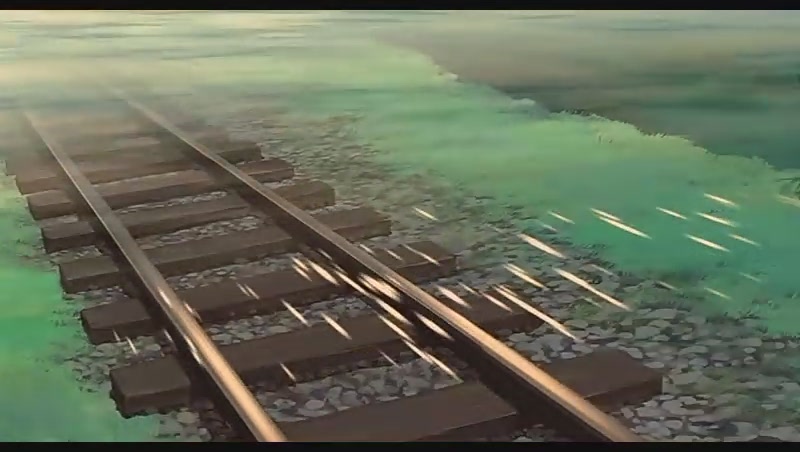
路..还很长
很长…

哎…

小时候总想着长大..
长大了确又不想长大…

窗外…
又下起了雨

未停…

Written by princehaku

17 4 月, 2009 at 11:30 上午

Posted in things goes by

with one comment

飞信炸弹v1.0做好咯~~(20090621修正V2.0)


现在时间…凌晨2:34
刚花了半个小时做了个这个东东~~
名曰飞信炸弹…其实也可以通用qq啊什么的

先简单的上几个图

图标….(网上找的)
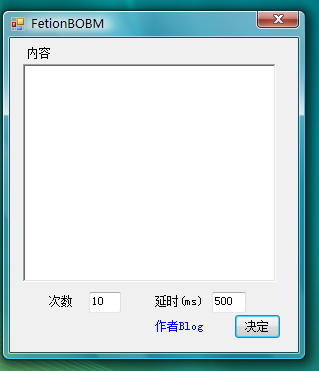
简单的界面

下载地址(如果不能运行…请先装net framework2.0)

备用下载地址1(只有在我电脑打开的时候才能下)

(20090621path—2.0–输入法bug修正)
说明在文件夹里面

最后附上源代码~~~

using System;
using System.Collections.Generic;
using System.ComponentModel;
using System.Data;
using System.Drawing;
using System.Text;
using System.Windows.Forms;
using System.IO;

namespace FetionBOBM
{
public partial class Form1 : Form
{
public Form1()
{
InitializeComponent();
}

private void button1_Click(object sender, EventArgs e)
{
if (this.richTextBox1.Text.ToString() == “”)
{
MessageBox.Show(“对不起..请输入要发送的话”);
}
else
{
//预处理vbs
setfile();
//将数据放入剪贴板
Clipboard.SetText(this.richTextBox1.Text.ToString());
//提示信息
MessageBox.Show(“按下确认键10秒后即开始发送~~\r\n在此时间内把光标移动到对话框内\r\n”);
//开始
startsend();
}
}
public int setfile()
{
//建立新文件
FileStream File=new FileStream(Application.StartupPath + “/temp.vbs”, FileMode.Create);
File.Close();
StreamWriter Wfile= new StreamWriter(Application.StartupPath + “/temp.vbs”);
//初始化
Wfile.WriteLine(“Dim WshShell\r\nSet WshShell=WScript.CreateObject(\”WScript.Shell\”)”);
//设定
Wfile.WriteLine(“WScript.Sleep 10000”);
Wfile.WriteLine(“for i=1 to ” + this.textBox1.Text.ToString());
Wfile.WriteLine(“WshShell.SendKeys \”^v\””);
Wfile.WriteLine(“WScript.Sleep ” + this.textBox2.Text.ToString());

Wfile.WriteLine(“WshShell.SendKeys \”{ENTER}\””);

Wfile.WriteLine(“WshShell.SendKeys \”^{ENTER}\””);

Wfile.WriteLine(“next”);
Wfile.Close();
return 1;
}
void startsend()
{
//调用此vbs
System.Diagnostics.Process.Start(Application.StartupPath + “/temp.vbs”);

}

private void linkLabel1_LinkClicked(object sender, LinkLabelLinkClickedEventArgs e)
{
System.Diagnostics.Process.Start(“http://hi.baidu.com/baizhongwei”);

}
}
}

很短….也很简单….

Written by princehaku

16 4 月, 2009 at 2:34 上午

Posted in technology

without comments

oh~~~no..


昏暗的天色
昏暗的心情

最近思绪有点混乱都不知道要做些什么好了=.=

哎…

或许我就不改编程的说…
越编感觉越孤独..

记得当初学编程就是因为孤独的说
还跑切参加比赛
三等奖….就三个人参加…

哎….

Written by princehaku

11 4 月, 2009 at 7:49 上午

Posted in things goes by

without comments

c++课程设计..终于完成


下载地址::

WEGmanager.zip
这ftp貌似有点点问题…

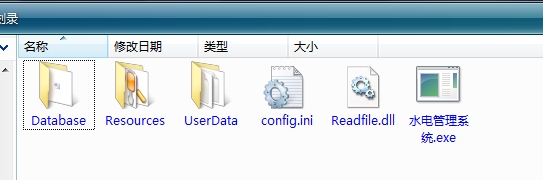
就这几个..,,,图标还没换…改天多…

readfile.dll那个动态连接库是自己写的..
以前一直觉得写那个很麻烦..
….其实也不麻烦嘛….呵呵
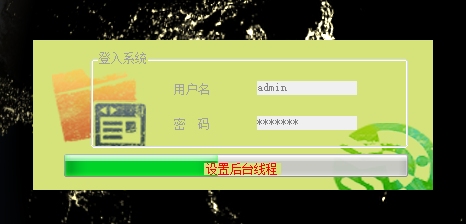
启动截图
密码的加密是md6(原创哦~~~…其实就是3次md5加乱序….)
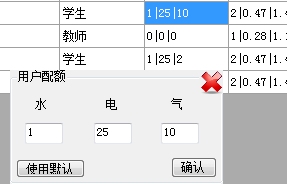
主界面
下面可以直接查询(ps:   access 的sql太麻烦咯….)
随便点个
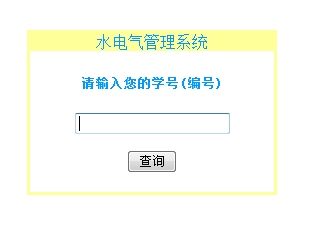
网络查询主界面(相当陋….能用则行)(用浏览器打开)
结果的显示(更陋……)
第二次用c#写程序……也感觉学到了很多很多
终于觉得为什么vb简单了….是因为我熟练了….
等哪天有空再考虑转行c++咯…..
ps:网络模块被提出来,重新改了个,原程序内的也可继续使用,新的用于系统服务\
附录:源代码(部分)
主界面源码
using System;
using System.Collections.Generic;
using System.ComponentModel;
using System.Data;
using System.Drawing;
using System.Text;
using System.Windows.Forms;
using System.Security.Cryptography;
using Readfile;
namespace My_project
{
     public partial class MainForm : Form
     {
         Readfile.Readfile rf = new Readfile.Readfile();
         public MainForm()
         {
             InitializeComponent();
         }
         public struct cell
         {
             public static int ColumnIndex;
             public static int RowIndex;
             public static string usertype;
         }
         private void userBindingNavigatorSaveItem_Click(object sender, EventArgs e)
         {
             //保存并重置数据单元
             this.Validate();
             this.userBindingSource.EndEdit();
             this.tableAdapterManager.UpdateAll(this.dataDataSet);
             this.LoadData();
         }
         //数据加密
         public static string GetMd6Str(string ConvertString)
         {
             MD5CryptoServiceProvider md5 = new MD5CryptoServiceProvider();
             string t2 = BitConverter.ToString(md5.ComputeHash(UTF8Encoding.Default.GetBytes(ConvertString)), 4, 8).Replace("-", "B");
             t2 += BitConverter.ToString(md5.ComputeHash(UTF8Encoding.Default.GetBytes(ConvertString)), 4, 8).Replace("-", "Z");
             t2 += BitConverter.ToString(md5.ComputeHash(UTF8Encoding.Default.GetBytes(ConvertString)), 4, 8).Replace("-", "W");
             return t2;
         }
         //填充数据库
         public void LoadData()
         {
             this.userTableAdapter.Fill (this.dataDataSet.user);
         }
         private void 删除ToolStripMenuItem_Click(object sender, EventArgs e)
         {
             foreach (DataGridViewCell c in userDataGridView.SelectedCells)
             {
                 if (c.RowIndex>=0) { this.userDataGridView.Rows.RemoveAt(c.RowIndex); }
             }
            
         }
         //设定当前单元格
         private void userDataGridView_CellMouseDown(object sender, DataGridViewCellMouseEventArgs e)
         {
             if (userDataGridView.SelectedCells.Count == 1 & e.ColumnIndex >= 0 & e.RowIndex >= 0 & e.Button==MouseButtons .Right)
             {
                 userDataGridView.CurrentCell = userDataGridView[e.ColumnIndex, e.RowIndex];
                
             }
         }
         private void 关于本程序ToolStripMenuItem_Click(object sender, EventArgs e)
         {
             AboutBox newabout= new AboutBox ();
             newabout.Show();
         }
         private void fwToolStripMenuItem_Click(object sender, EventArgs e)
         {
             groupBox3.Visible = true;
         }
         private void MainForm_FormClosed(object sender, FormClosedEventArgs e)
         {
             //终止所有线程并结束程序
             Application.Exit();
         }
         private void hideall()
         {
             //隐藏所有可能出现的窗体
             groupBox2.Visible = false;
             button1.Visible = false;
             groupBox1.Visible = false;
         }
         private void userDataGridView_CellDoubleClick(object sender, DataGridViewCellEventArgs e)
         {
             string[] data=new string[0];
             hideall();
             switch (e.ColumnIndex)
             {
                 //配额  
                 case 5:
                     groupBox1.Text = "用户配额";
                     //读取数据
                     data = userDataGridView.CurrentCell.Value.ToString().Split(‘|’);
                     if (data[0] != "")
                     {
                         water.Text = data[0];
                         elec.Text = data[1];
                         gas.Text = data[2];
                     }
                     else
                     {
                         water.Text = "0";
                         elec.Text = "0";
                         gas.Text = "0";
                     }
                     cell.ColumnIndex = e.ColumnIndex;
                     cell.RowIndex = e.RowIndex;
                     groupBox1.Visible = true;
                     button1.Visible=true;
                     //用户类型
                     cell.usertype = userDataGridView[e.ColumnIndex – 1, e.RowIndex].Value.ToString();
                     break;
                 //单价
                 case 6:
                     groupBox1.Text = "单价";
                     //读取数据
                     data = userDataGridView.CurrentCell.Value.ToString().Split(‘|’);
                     if (data[0] != "")
                     {
                         water.Text = data[0];
                         elec.Text = data[1];
                         gas.Text = data[2];
                     }
                     else
                     {
                         water.Text = "0";
                         elec.Text = "0";
                         gas.Text = "0";
                     }
                     cell.ColumnIndex = e.ColumnIndex;
                     cell.RowIndex = e.RowIndex;
                     groupBox1.Visible = true;
                     button1.Visible = true;
                     //用户类型
                     cell.usertype = userDataGridView[e.ColumnIndex – 2, e.RowIndex].Value.ToString();
                     break;
                 //使用
                 case 7:
                     groupBox1.Text = "已经使用";
                     //读取数据
                     data = userDataGridView.CurrentCell.Value.ToString().Split(‘|’);
                     if (data[0] != "")
                     {
                         water.Text = data[0];
                         elec.Text = data[1];
                         gas.Text = data[2];
                     }
                     else
                     {
                         water.Text = "0";
                         elec.Text = "0";

啊……..文章过长……..

Written by princehaku

10 4 月, 2009 at 8:12 上午

Posted in c/c++

without comments

20081221-发布了!!


耗时一周的东西终于出来了…虽然还有一些bug…但是简单的应用没有问题了
这个东西就是!!!!!!!!!_———-web服务器————–!!!!!!!!!!!!!!
目前可以支持视频,音频,图片,文字,,,,,可以通过它建立你自己的web站点(html的)
而且加入了cgi支持…你可以使用他写php动态网页   程序里面有个例子

下载后点启动服务.然后在浏览器输入你的ip地址(开始-运行-cmd-ipconfig   就可以看到了)就可以访问…..也可输http://localhost访问本地…当然..如果你是外网ip..你可以把ip地址给你的朋友..让他们也可以看到你的网站

程序使用vb.NET 2005 建造 编译
源码就不放出了…应该没人需要吧……
在xpsp2和vista64下调试…目前已知bug如下:::::以后修复
1 ..xp下php无法连接至mysql
2 ..gd库产生的图像无法被正确识别(多了个数据头….如果清理了就可以了)
3 ..一些环境变量未写入…比如$_SERVER..基本都不能用…
4 ..如果同时传递post和get数据.将只有post输出
5 ..服务器的速度还有点慢.占系统资源还有点多.

bug好像有点多………讲究了——以后有时间再修补

最后是下载连接
http://www.rayfile.com/files/6c5af8a8-ceba-11dd-a7ae-0014221b798a/

(经确认还能下载….)

如果启动程序时显示错误…请先安装.NET frameWork2.0
下载地址http://www.microsoft.com/downloads/details.aspx?FamilyID=0856EACB-4362-4B0D-8EDD-AAB15C5E04F5&displaylang=zh-cn

最最后::::::::::::谨以此程序纪念逝去的18岁
最最最最后::::::::祝自己19岁快乐

Written by princehaku

12 3 月, 2009 at 7:47 上午

Posted in technology

without comments

20090213–screendot发布!!!


今天在那儿做网站
想直接套用一个网站的横幅
然后捏
就需要他的宽和高..
虽然可以用photoshop或者qq测量…
但觉得有点麻烦
于是决定自己做个程序(虽然有这种程序了,但想练习下编程) 来测量屏幕上两点的距离
于是开始做….终于在53分钟25秒后搞定了主程序部分..然后做了下修改

使用说明:
1.运行它…..(它会在后台运行…你看不到滴)
2.然后按下ctrl和F3键….主界面出现
3.点击鼠标左键选取A点…然后再点击鼠标右键选取B点……A点可以重复选取..但只保留最后那个
4.然后你会发现结果已经出来了
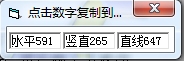
再点下就可以复制到剪贴板咯
要重新开始的话就再按次ctrl+F3就可以了

下载地址:
已经挂了…..

ps:请不要乱动我的ftp……’_’

Written by princehaku

12 3 月, 2009 at 7:45 上午

Posted in technology

without comments

20090114–整理


这假期事情还是有点多…虽然没作业
首先要看英语….然后是XNA….然后是科技部的网站…..
但这几天啥子都没做..基本就在耍……..

今天弄了点时间把以前的3个没弄完整的修复了下

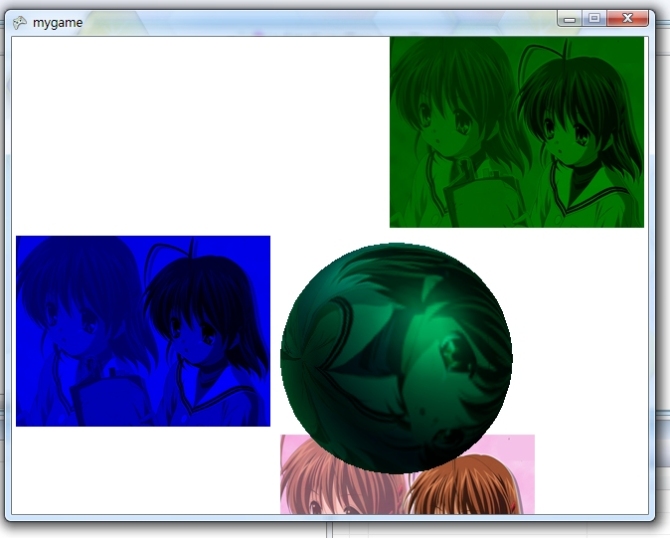
首先是这个…….只是个demo…学习用的…
中间的那个是个球体…贴图就是背景上的那副图(电脑图片不多…讲究了)
第1和第2张都是用了alpha通道混合后的.第3张是原图
左边还有文字.(这张图看不到)
然后….按方向键是移动球体….按A是旋转球体……….E和R是放大和缩小
就暂时学这么多了….其他的等下学期学了线代再来….(还有啥子世界矩阵哦…搞不懂…..)
下载地址:
挂了….

然后是上次生日的时候放出的webserver———-现在删掉了php的支持……但是其他没问题了(尚不支持firefox)
主要是修复了编码的错误

下载地址:
挂了….

最后…
是一个用vb6做的聊天工具….未什么做这个?…….我们现在寝室还没联网……不能用qq……..所以说做个这个还是可以滴
而且…..messenger服务我的vista没有……就做了个这个….以后会逐渐加上一些局域网内常用的功能….比如ftp..比如http通告

使用方法///服务器端使用server.exe
                 ///客户端使用client.exe
默认的端口是TCP-12980和UDP-3298,,,,,,,确保未被其他程序占用
下载地址:
挂了….

ps:请千万不要乱动我的ftp
ps2:half2果然经典啊啊啊啊啊啊啊啊啊啊啊啊啊啊啊啊啊啊啊啊啊啊

Written by princehaku

12 3 月, 2009 at 7:44 上午

Posted in things goes by

without comments

开博拉!


开博了,
按某人话说:给自己的心灵留个空间,
按自己的话说:想在不断的忘记中留下些不愿忘记的过去

以前q-zone里面的东西还放那里等它了
黑基有时间就和这里同步更新

新的开始~~~oyeah

Written by princehaku

12 3 月, 2009 at 7:35 上午

Posted in things goes by

without comments